
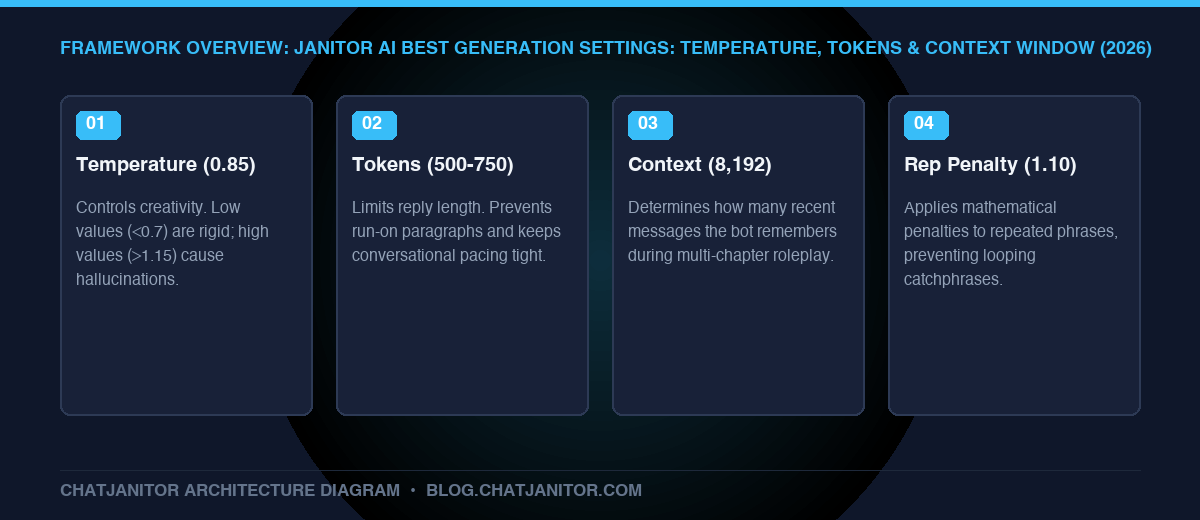
The sweet spot for Janitor AI settings is a Temperature of 0.85, Max Response Tokens of 500–700, a Context Window of 6,144–8,192, and a Repetition Penalty of 1.10. These settings balance vivid creative prose with grammatical coherence, preventing repetitive loops and memory degradation. Review our core janitor ai hub for platform fundamentals.
Key Takeaways
- Temperature Sweet Spot: Keep temperature between
0.75and0.95. Values above1.15cause nonsensical gibberish; values below0.65lead to rigid, robotic cliches. - Max Response Length: Setting max tokens to
500–700produces balanced 2-3 paragraph replies without forcing the bot into endless run-on sentences. - Context Management: A context window of
6k–8ktokens ensures the model recalls recent dialogue without slowing down server inference times. - Repetition Breaker: When an AI fixates on a specific catchphrase, bumping repetition penalty to
1.12immediately breaks the cycle. - Explore Next: If you encounter persistent glitches despite optimal settings, learn to fix ai roleplay repetitive loops or configure custom endpoints via janitor ai api setup.
1. Why Generation Settings Matter
Many users assume an AI bot’s intelligence is entirely determined by its character card description. In reality, generation parameters dictate how the model samples words from probability distributions.
A masterfully written bot with incorrect settings will deliver repetitive, repetitive, or nonsensical dialogue. Conversely, an average bot with dialed-in parameters will feel responsive, unpredictable, and remarkably human.
2. Parameter Deep-Dive: What Each Slider Does
| Temperature Range | Behavior & Output Style | Best Used For |
|---|---|---|
| 0.20 – 0.65 (Low) | Highly predictable, rigid, grammatically sterile, prone to repetitive phrasing. | Technical Q&A, factual summarization. |
| 0.75 – 0.95 (Optimal) | Vivid sensory descriptions, emotional subtext, and creative conversational variety. | Standard Roleplay Sweet Spot (Recommended: 0.85). |
| 1.05 – 1.40+ (High) | Unpredictable word choices, rapid topic jumps, occasional broken syntax or hallucination. | Surreal dream sequences, chaotic comedy. |
2.1 Temperature (0.0 to 2.0)
- What it does: Controls randomness in word selection.
- Under 0.70: The model always selects the most probable tokens. Dialogue becomes robotic, highly predictable, and repetitive.
- 0.75 – 0.95 (Recommended): The optimal storytelling range. Output is colorful, emotionally expressive, and grammatically sound.
- Over 1.20: The AI selects improbable tokens, resulting in broken grammar, sudden topic jumps, and hallucinations.
2.2 Max New Tokens (Response Length)
- What it does: Sets the hard ceiling on how many tokens the bot can generate in a single turn.
- Recommended Value:
500 to 750 tokens(roughly 350–500 words). - Pro Tip: Avoid setting this to maximum (
2048+) unless you specifically want novel-length essays. Excessive token lengths encourage the bot to speak on your behalf just to fill its quota.
2.3 Context Window (Context Size)
- What it does: Determines how much conversation history the AI passes into memory on each prompt.
- JanitorLLM Free: Usually capped at
4,096to8,192tokens. - DeepSeek / Claude via API: Can support
16,000+tokens.
2.4 Repetition Penalty / Frequency Penalty
- What it does: Penalizes words that have already appeared recently in the conversation.
- Recommended Value:
1.08 to 1.15. - Warning: Setting this above
1.25will cause the bot to use bizarre synonyms because it is barred from using common words like “the”, “he”, or “said”.
3. Recommended Preset Profiles
| Use Case | Temperature | Max Tokens | Context Window | Repetition Penalty |
|---|---|---|---|---|
| Intense Story / Action | 0.85 |
600 |
8,192 |
1.10 |
| Slow-Burn Romance | 0.80 |
750 |
8,192 |
1.08 |
| Philosophical / Mystery | 0.75 |
500 |
6,144 |
1.05 |
| Fantasy RPG Combat | 0.90 |
450 |
4,096 |
1.12 |
4. How to Apply Settings in Janitor AI
- Open any chat screen on Janitor AI.
- Click the three horizontal dots (
...) in the upper navigation bar. - Select Generation Settings.
- Adjust the sliders according to your preferred profile above.
- Click Save Settings. (Note: Settings are saved globally across your active chats unless specified per character).
Conclusion
Dialing in your generation settings transforms Janitor AI from a standard chatbot into a finely tuned interactive novelist. Once your parameters are set, pair them with the right chat syntax to maintain total narrative control.
- Need beginner guidance? Read how to use janitor ai.
- Want more compute power? Check out our janitor ai api setup guide.
- Bot repeating phrases? Learn how to fix ai roleplay repetitive loops.