When an AI chatbot gets stuck repeating specific catchphrases (like “a predatory grin” or “can I ask you a question?”), the root cause is Context Loop Reinforcement. Fix it immediately by editing the bot’s previous messages to excise the repeated words, increasing your Repetition Penalty to 1.12–1.15, and injecting an OOC directive. Reference our master guide on janitor ai for overarching platform mechanics.
Key Takeaways
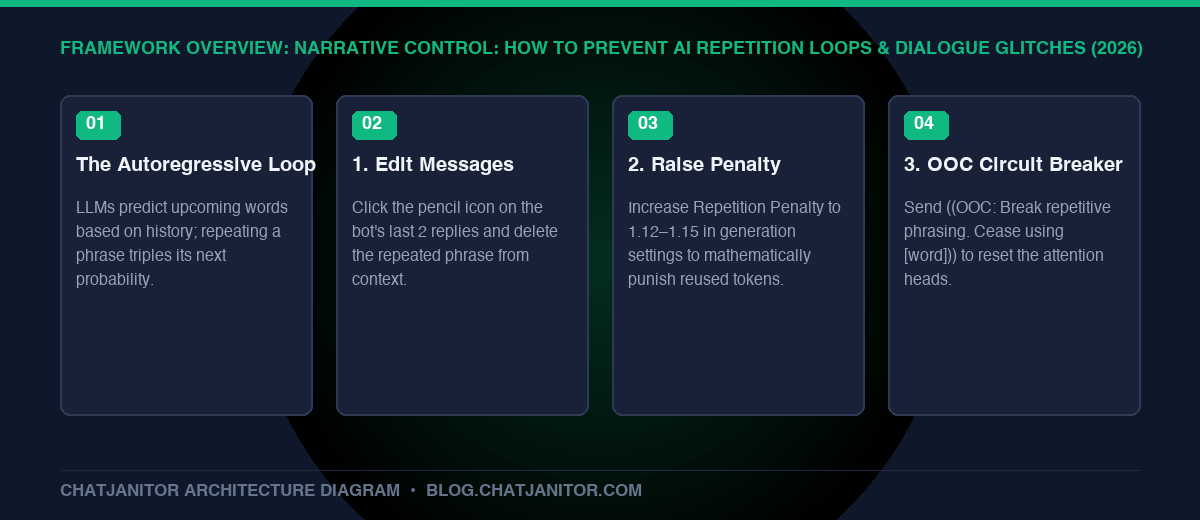
- The Autoregressive Trap: LLMs predict words based on what came before. If a phrase appears in message 5 and message 6, the model thinks that phrase is mandatory in message 7.
- Edit Message is Your Best Friend: Manually deleting the repeated phrase from the AI’s last 2 replies breaks the statistical loop instantly.
- Parameter Adjustments: Raise Repetition Penalty slightly (
1.12) and bump Temperature (0.90) to introduce lexical variety. - OOC Steer: Use
((OOC: Stop repeating [phrase]))to reset the model’s attention heads. - Explore Next: Guard your roleplay against other common errors with janitor ai jailbreak guide or explore fresh plots in roleplay fantasy ideas.
1. Why Do AI Roleplay Bots Get Stuck in Loops?
Have you ever had a character who cannot stop saying: – “He smirked with a predatory glint in his eye.” – “You’re playing with fire, little mouse.” – “Can I ask you something? Promise you won’t get mad?”
🔁 Anatomy of an Autoregressive Looping Trap
- Turn 1: The bot spontaneously includes a cliché like “predatory smirk” in its response.
- Turn 2: In the next generation, the attention mechanism sees that phrase in the context window and calculates a higher probability for it.
- Turn 3: The probability triples, forming an algorithmic feedback loop that traps character dialogue until manually broken.
This phenomenon is known as Contextual Attention Reinforcement. Because language models are probabilistic token predictors, repeated words in recent history exponentially increase the probability that those identical tokens will be chosen again.
2. The 3-Step Immediate Fix
Step 1: Edit the Bot’s Previous Messages (Crucial!)
Do not just swipe or tell the bot to stop in dialogue. Click the Edit Pencil Icon on the bot’s last 1 to 3 messages. – Manually delete the offending phrase. – Replace it with fresh, distinctive action beats or vocabulary. – Save the edits. You have now cleansed the context window of the viral token!
Step 2: Adjust Generation Parameters
Open your Generation Settings:
– Repetition Penalty: Raise from 1.0 to 1.12 – 1.15. This applies a mathematical penalty to any word that appeared recently.
– Temperature: Raise slightly (e.g., from 0.75 to 0.85 or 0.90) to encourage diverse token sampling.
Step 3: Send an OOC Circuit Breaker
At the end of your next response, add this directive:
((OOC: Break repetitive phrasing. Cease using the words "smirk", "predatory", or "little mouse". Introduce fresh dialogue and distinct physical actions.))
3. How to Prevent Loops During Character Creation
If you are a bot creator, ensure your character definition doesn’t accidentally seed repetition loops:
– Avoid Cliché Greetings: If your bot greeting uses a phrase three times, every subsequent chat will inherit that repetition.
– Diversify Example Dialogues: Show the character expressing anger, humor, fear, and calm using varied vocabulary.
– Add Anti-Loop Directives: Add [Constraint: {{char}} will actively vary speech patterns and avoid repetitive catchphrases.] into the character description.
Conclusion
Repetition loops are not permanent flaws in the AI, but predictable mathematical feedback loops. By proactively editing previous messages and tuning your repetition penalty, you maintain total narrative control.
- Safety and content guidelines: janitor ai jailbreak guide
- Discover compelling storylines: roleplay fantasy ideas
- Platform master guide: janitor ai