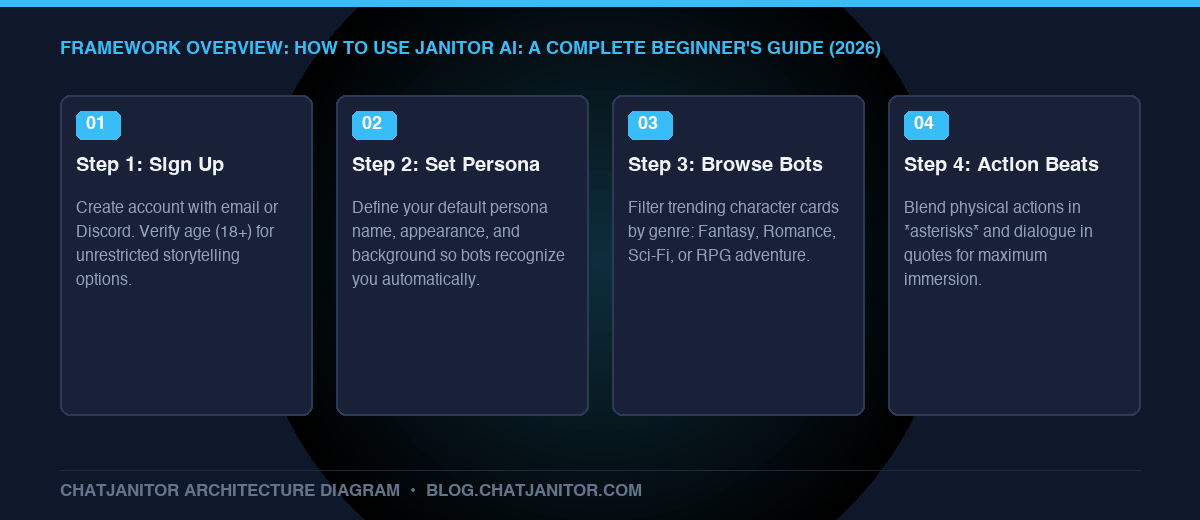
To start using Janitor AI, create an account at janitorai.com, configure your custom User Persona, search for a character bot that matches your desired genre, and choose between the free native JanitorLLM or an external API. Use Markdown asterisks *like this* for actions and quotation marks "like this" for spoken dialogue. Bookmark our master overview of janitor ai for advanced architecture insights.
Key Takeaways
- Quick 3-Minute Setup: Registration requires only an email address and age verification (18+ for unrestricted content).
- Persona Persistence: Setting up your User Persona ensures characters remember your name, gender, and physical traits across different chats.
- Dual Inference Choice: Begin with the free JanitorLLM; upgrade to external APIs (DeepSeek, Claude, OpenRouter) later if you desire advanced literary prose.
- Narrative Formatting: Blending actions in asterisks and dialogue in quotes leads to dramatically higher bot responsiveness.
- Next Step: Fine-tune your response creativity with our guide to janitor ai settings and master janitor ai commands list.
1. Introduction: What Makes Janitor AI Unique?
If you are transitioning from standard AI assistants or mainstream platforms like Character.AI, Janitor AI will feel like entering an open writer’s studio. Designed without restrictive conversational shackles, Janitor AI empowers roleplayers to explore rich, emotionally nuanced, and complex creative scenarios.
Whether you want to interact with anime archetypes, high-fantasy companions, or psychological mystery detectives, this guide walks you through every click from sign-up to your first message.
2. Step 1: Creating Your Account and Verifying Profile
- Visit the Platform: Head to the official Janitor AI website on desktop or mobile.
- Register: Click Register in the top-right corner. You can register using Google, Discord, Twitter/X, or a standard email/password combination.
- Age Verification: Confirm your date of birth. Janitor AI adheres strictly to age-gating policies to safeguard its community.
- Choose Your Handle: Pick a unique username and display name.
3. Step 2: Configuring Your User Persona (Crucial Step)
Most beginners skip this step and immediately regret having to remind the bot who they are every five messages.
👤 Persona Creation Workflow
- Step 1: Click your Profile Avatar > Select Personas.
- Step 2: Click Create New Persona.
- Step 3: Fill in attributes:
- Name: Alex (what characters call you)
- Pronouns: He/Him or She/Her
- Appearance: Tall, messy dark hair, weathered leather coat
- Background: A wandering mercenary exploring the northern frontier
- Step 4: Check Set as Default Persona so all bots read this automatically!
- Click your avatar icon in the top navigation and select Personas.
- Click Create New Persona.
- Fill out:
- Persona Name: The name characters will call you.
- Appearance & Details: A concise 2-4 sentence description of your appearance, clothing, and tone.
- Avatar Image: Upload a square profile picture.
- Set this persona as your Default Persona. Now, every bot you chat with will read these attributes automatically!
4. Step 3: Finding the Right Character Bot
Janitor AI hosts over 150,000 bots created by the community. To find top-tier characters:
- Trending & Popular: Great for finding characters with tested greetings and well-structured prompts.
- Search Filters: Filter by tags like
Fantasy,Sci-Fi,Enemies to Lovers,Slice of Life, orRPG. - Bot Details Inspection: Click a bot card to inspect its definition. Look for bots with detailed introductory greetings and well-defined personality traits.
5. Step 4: Selecting Your AI Backend
When you open a chat session, click the menu button (...) in the top right and select API Settings.
- JanitorLLM (Beta): Select this if you want 100% free, unlimited roleplay without configuring any API keys.
- Proxy / External API: If you have an OpenRouter or DeepSeek key, paste your endpoint and key here.
6. Step 5: Formatting Your First Message
To get immersive, multi-paragraph responses from the AI, avoid single-word openers like “Hi”. Instead, react directly to the bot’s opening scene using standard roleplay Markdown:
*I step through the tavern door, brushing the heavy snow from my shoulders. Scanning the crowded room, my eyes lock onto you seated in the corner booth. I approach slowly, resting a hand on the wooden chair opposite you.*

"Mind if I sit here? The rest of the tables are taken."
By providing both an action (surrounded by *asterisks*) and spoken dialogue (enclosed in "quotes"), you give the LLM clear context to build upon.
7. Useful Chat Shortcuts and Controls
- Regenerate (Swipe): If you don’t like a response, click the arrow icon to generate an alternate reply.
- Edit Message: You can edit both your messages and the bot’s messages to correct typos or steer the narrative back on track.
- Branching Chats: Create multiple chat branches from a single pivot point to explore different storyline paths.
Conclusion
Getting started with Janitor AI is simple once you configure your persona and grasp basic narrative formatting. As you become more experienced, you will want to optimize your response quality and fix annoying repetition loops.
Next Guides in this Series:
- Optimize your model output: janitor ai settings
- Master formatting shortcuts: janitor ai commands list
- Return to the comprehensive guide: janitor ai