To gain full narrative control on Janitor AI, use Markdown formatting (*actions*, "dialogue", **emphasis**), OOC syntax (((OOC: instructions))), and dynamic template variables ({{char}}, {{user}}). Enable Text Streaming to see bot replies generate word by word. Reference our master janitor ai manual for full platform architecture.
Key Takeaways
- OOC Command Power: Wrapping steering instructions in double parentheses
((OOC: ...))guides the AI without breaking the immersion of the fictional universe. - Dynamic Variables: When creating bots or writing prompts,
{{char}}automatically resolves to the bot’s name, while{{user}}resolves to your persona name. - Text Streaming Demystified: Streaming outputs tokens in real-time, reducing perceived latency compared to batch processing.
- Formatting Hygiene: Clean Markdown formatting directly influences the literary quality of the model’s output.
- Explore Further: Browse pre-made system instructions in ai chat roleplay prompts or refresh your platform basics with how to use janitor ai.
1. The Core Markdown Formatting Cheatsheet
Janitor AI renders GitHub-flavored Markdown. Using clean Markdown keeps your story organized and teaches the AI how to structure its replies.
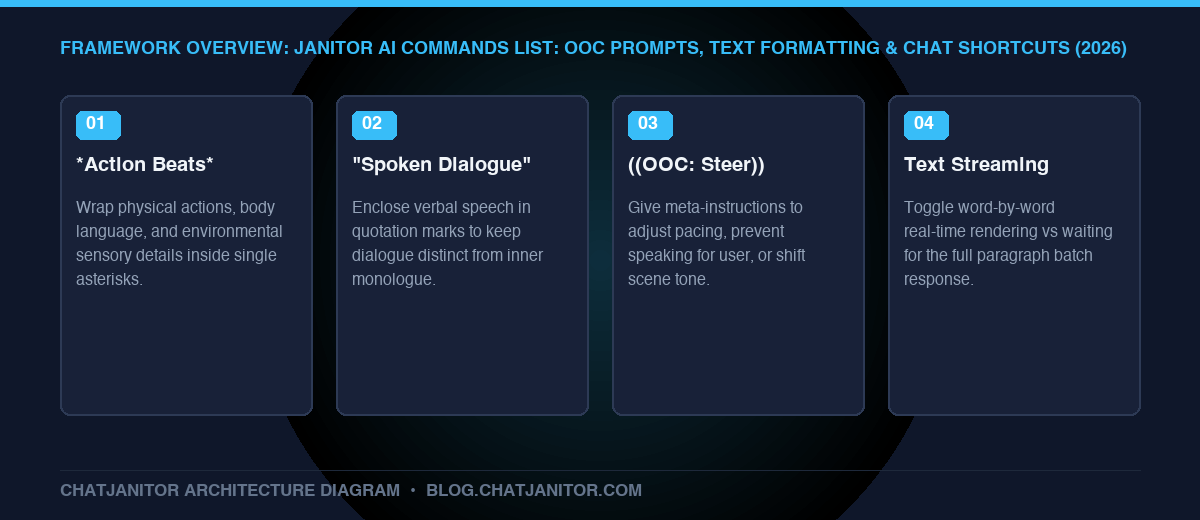
*Actions, body language, sensory details, and environment*
Example: *I step back toward the fireplace, warming my cold hands.*

"Spoken dialogue out loud"
Example: "We need to leave before nightfall."

**Bold emphasis for shouting or dramatic impact**
Example: "I told you **not** to open that door!"

*Italicized thoughts or internal monologue*
Example: *What on earth is he planning?* I wonder silently.

~Whispers, flirtatious remarks, or trailing voices~
Example: ~Don't make a sound...~
2. OOC (Out Of Character) Commands
OOC commands are direct meta-instructions given to the underlying AI model. They allow you to alter the story’s trajectory, enforce boundaries, or fix continuity errors without breaking character inside the fiction.
| Narrative Layer | Example Syntax | Purpose & AI Interpretation |
|---|---|---|
| Fictional Storyline | *I draw my sword.* "Stand back!" |
In-character actions and dialogue executed within the fictional world. |
| Meta-Instruction Layer | ((OOC: Please slow down pacing.)) |
Direct instructions to the underlying LLM to adjust tone, pacing, or scene elements without breaking character. |
Essential OOC Command Templates:
- Pacing Control:
((OOC: Slow down the pacing. Focus on detailed sensory descriptions and internal thoughts before taking any action.)) - Preventing Bot Speaking for You:
((OOC: Do NOT write dialogue, thoughts, or actions for {{user}}. Strictly roleplay as {{char}} only.)) - Tone Adjustment:
((OOC: Shift the tone to be more melancholic and serious. Avoid comedic or playful banter.)) - Scene Transition:
((OOC: Fast-forward the scene to the following morning when both characters arrive at the tavern.))
3. Dynamic Template Variables
When designing character cards, opening greetings, or custom prompts, use these system variables:
| Variable | Description | Example Replacement |
|---|---|---|
{{char}} |
Automatically inserts the character bot’s name | “Kaelen” |
{{user}} |
Automatically inserts your active Persona’s name | “Alex” |
{{persona}} |
Injects your User Persona description text | Persona profile body |
4. What Is Text Streaming in Janitor AI?
A common question among new users is: “What is text streaming, and should I turn it on?”
| Mode | Generation Behavior | Best Used When |
|---|---|---|
| Text Streaming ON (Recommended) | Tokens render word-by-word in real time as computed by the neural network. | Default mode for fast, natural conversational pacing and instant reading. |
| Text Streaming OFF | Waits until the full response is calculated before rendering the entire paragraph at once. | Recommended on older mobile devices or unstable network connections to prevent UI stutter. |
- Streaming Enabled (Recommended): The AI streams tokens to your screen in real time as they are computed. This provides instant feedback, allows you to read while the bot is still typing, and mimics real conversation.
- Streaming Disabled: The client waits until the full response is calculated before rendering the entire message at once. Turn streaming off only if you experience screen stutter or mobile rendering lag.
To toggle streaming: Click ... ➔ Generation Settings ➔ Text Streaming Toggle.
5. Summary Reference Table
| Syntax / Tag | Primary Function | Best Practice |
|---|---|---|
*text* |
Physical action & scene description | Use in every response to ground dialogue |
"text" |
Spoken dialogue | Keep distinct from internal thoughts |
((OOC: text)) |
Meta-instructions to LLM | Place at very bottom of your message |
{{char}} |
Bot name placeholder | Use in bot definitions and system prompts |
{{user}} |
User name placeholder | Keeps bot cards universal for all users |
Conclusion
Mastering Janitor AI commands and syntax gives you authorial control over your roleplay sessions, turning unpredictable outputs into consistent, high-art interactive storytelling.
- Having issues with errors? See janitor ai not working
- Beginner walkthrough: how to use janitor ai
- Deep prompt library: ai chat roleplay prompts